A New Look for Your Legal Research: Introducing the Redesigned Homepage and the New myCanLII!
A little over a month ago, we introduced CanLII Search+, a major step forward in making legal research more intuitive. Today, we are thrilled to announce a significant update to a core part of your research experience: the launch of the new myCanLII. It launched unofficially on Saturday, so you might already be familiar with it!
Since its inception, myCanLII has been the place to manage your preferences and saved content. This latest update modernizes that experience, making it easier than ever to keep your research organized and accessible.
A Redesigned Homepage Experience
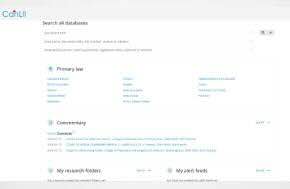
The first thing you will notice is a light redesign of the CanLII homepage. We wanted to make sure your most important work is available the moment you arrive on the site.
For those signed into a myCanLII account, the homepage now features two dedicated sections:
- My research folders: Quickly jump back into a specific folder.
- My alerts: See your latest updates and managed notifications at a glance.
What’s New in myCanLII?
Beyond the homepage, the updated myCanLII interface is designed to be faster and more organized:
- ?Your Alerts & Notes: All your existing alerts and associated notes remain active and have been migrated.
- Saved Documents: Any CanLII documents you have saved for quick reference, including associated notes, are available in your account.
- Research Folders: Your folder content has moved to a new single-level structure. While sub-folders have been flattened, all of your CanLII documents and personal notes have been migrated and remain accessible. CanLII documents not previously saved to a folder have been automatically added to a default research folder.
A Smooth Transition with Legacy Access
We understand that change takes time. While the new myCanLII is now your primary workspace, the legacy version remains available in read-only mode for one full year.
This “grace period” allows you to:
- Review Your History: Access any specific content or data not included in the automated migration.
- Transition at Your Own Pace: Ensure your external records are updated without any rush.
- Maintain Continuity: Reference your old setup as you get settled into the new environment.
You can find the link to the legacy platform within your updated account profile.
What’s Next?
The new myCanLII is ready for you. To get started, simply click the Sign In button in the top right corner of the page.
Upon your first sign-in, you’ll receive a welcome message introducing you to the updated interface. From there, all sign-in features—including CanLII Search+—are fully operational and ready to help you continue your research exactly where you left off.
Thank you for being a vital part of the CanLII community. We hope this refined experience makes your legal research more efficient and productive than ever before!
A New Look for Your Legal Research: Introducing the Redesigned Homepage and the New myCanLII!